 pauldalton.ai2026-09
⏺Read ~/paul/writing/2026-09-paulmoji.md
Paulmoji: 53 of me, free to download
2026-09 · Paul Dalton
Every team chat eventually develops a vocabulary that standard emoji can't
carry. There is a specific face for the deploy went out on a Friday, and
:grimacing: is not it.
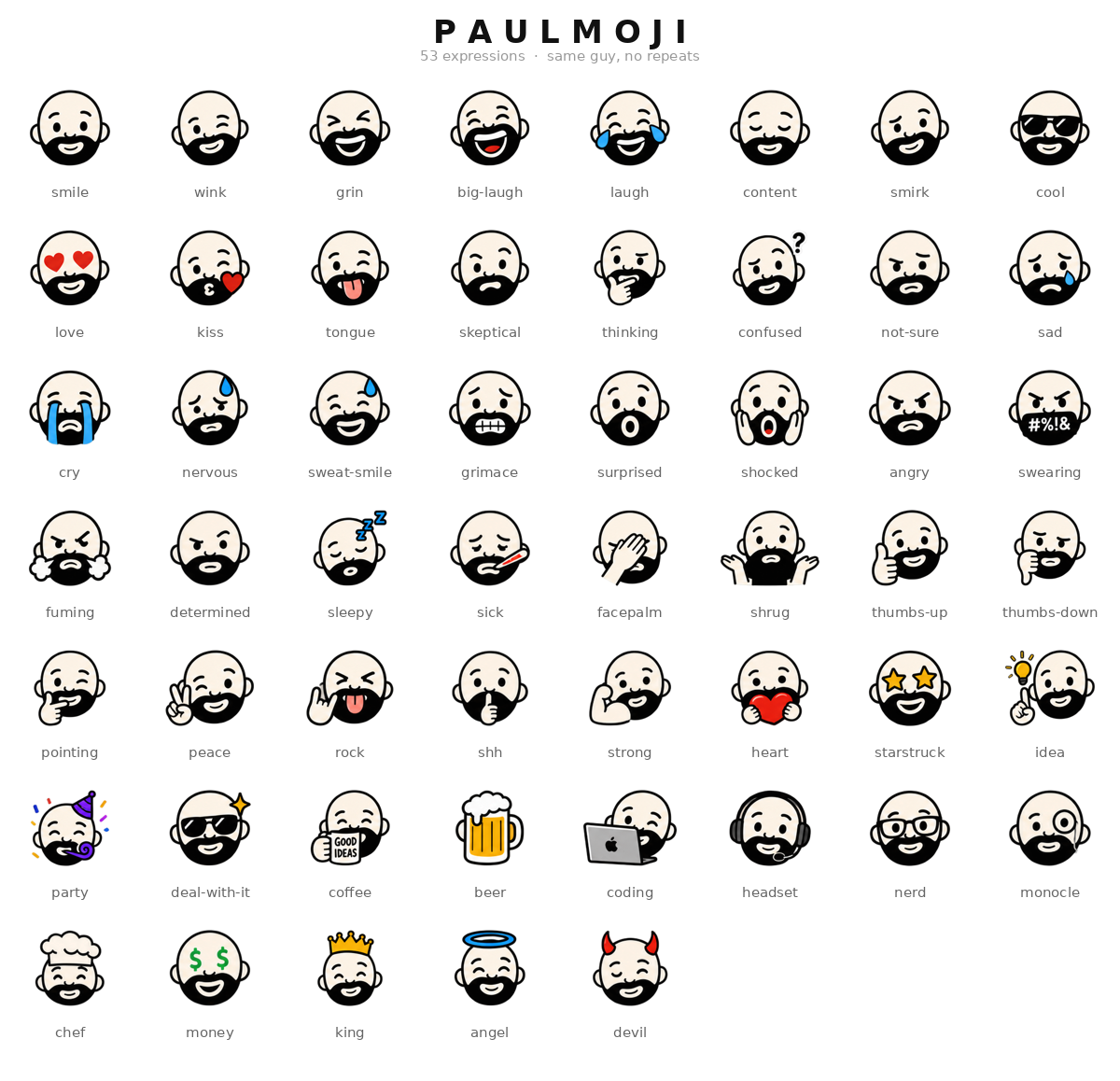
So I drew mine. 53 expressions, one guy, no repeats.
⏺download paulmoji-pack.zip
Download the pack — free, and free to use.
What's in the zip
Two full sets of the same 53 faces, both transparent PNG:
- 128px — the Slack and Discord set. Every file lands well under Slack's 64 KB per-emoji cap, so nothing gets rejected at upload.
- 512px — the sticker set. Telegram wants exactly 512x512 transparent PNG, so those files go straight in with nothing to resize.
Plus preview.png (the sheet above), a manifest.csv of all 53 names, and a
README that repeats the upload steps for each platform.
Files are named NN-name.png — 09-love.png, 42-deal-with-it.png. The
number is just sheet order. When you upload, the emoji name is the back half on
its own: :love:, :deal-with-it:.
Getting them in
Slack — Settings > Customize > Emoji > Add Custom Emoji, using the 128px folder. The UI takes one file at a time, which is tedious at 53; a bulk-upload browser extension does the whole set in a couple of minutes.
Discord — Server Settings > Emoji > Upload Emoji, also 128px. Free servers cap at 50 custom emoji, so you're trimming three or you have boosts.
Telegram — message @Stickers, run /newpack, feed it the 512px files.
WhatsApp and iMessage — the 512px files with any sticker-maker app.
Everywhere else they're just PNGs with no background. Slides, docs, a README, a site — they drop in fine.
They're already in the dashboard
If you use Paul's Dashboard, you don't need the zip at all. The whole pack ships inside the Emoji Picker widget as its own tab:
⏺emoji_picker.tab('paulmoji')
Search by name or by what you mean — dunno finds shrug, phew finds
sweat-smile. Click copies the image, so it pastes as a picture into Slack,
Discord, or Teams. Drag pulls the actual PNG out onto your desktop. There's a
recents row, because in practice everyone uses the same six.
The terms, briefly
Use them. Personal, work, your own Slack, your group chat — go ahead. Just don't resell the pack or pass it off as yours.
If you put them somewhere good, I'd like to see it.
next: all writing · rss · back to the session ↺